

What "document to podcast" actually means#
A document-to-podcast tool takes a file you already have, a PDF, a slide deck, a Word document, a research paper, and turns it into a spoken audio episode, usually a two-host conversation rather than a single narrated voice. You upload the file, the tool reads it, and a few minutes later you have audio.
That much is now a solved and crowded problem. A dozen tools do it, several are free, and the results genuinely sound impressive. So the interesting question is no longer "can I turn this document into a podcast?" It is two harder questions that almost none of the tools compete on: will anyone actually finish the audio, and is it accurate enough to put your name on?
This guide covers the whole category: how the conversion works, what separates the tools, which file types convert well and which do not, and the two problems, completion and accuracy, that decide whether the output is useful or just a novelty. We make one of these tools, Sprep, so we will be upfront about that and about where other tools are the better choice.
Why turn a document into a podcast at all?#
The honest answer is not "because audio is better than reading." Often it is not. The answer is that most documents do not get finished, and a podcast does.
Long-form written content typically sees only 20 to 30 percent of readers reach the end. Podcast episodes, by contrast, commonly see 70 to 80 percent completion. A document that is abandoned a quarter of the way through delivers nothing on the remaining three-quarters, no matter how good the writing is. Audio wins not because it is a superior format for comprehension, but because it reaches a time that reading cannot: commutes, workouts, dishes, the walk to the station. This is the core argument we make in the unread problem, and it is the reason this category exists at all.
That framing matters because it tells you when converting a document is worth it and when it is not. If the document is a reference people look things up in, audio is the wrong format. If it is an argument, an explanation, an update, or a training module that is currently going unread, audio is often the difference between the content landing and not.
How document-to-podcast conversion works#
Under the hood, almost every tool follows the same four steps. Understanding them tells you where quality is won and lost.
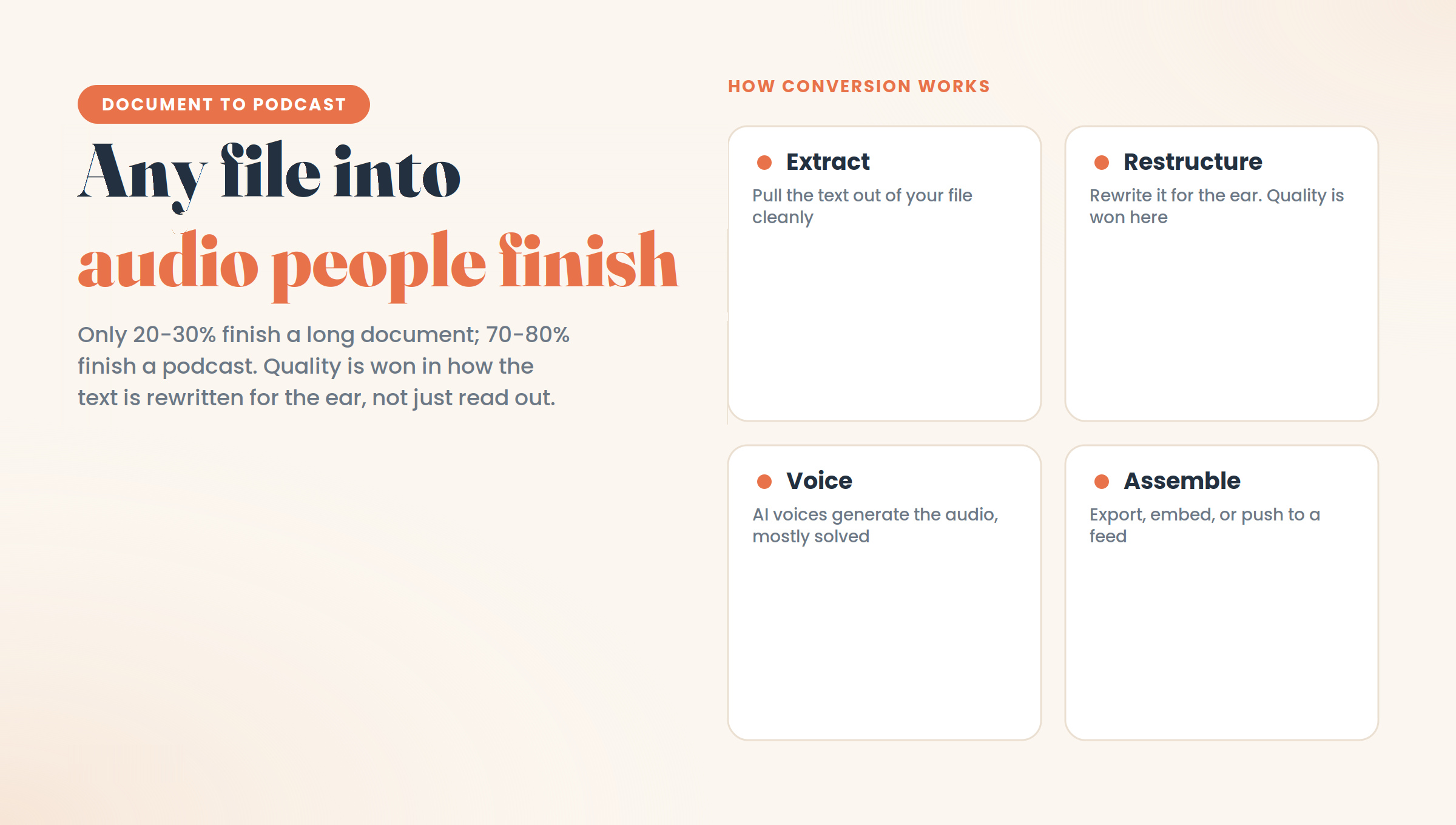
1. Extraction. The tool pulls the text out of your file. Clean, well-structured documents extract well. Scanned pages, complex tables, and image-heavy slides extract badly, which is the first place quality drops.
2. Restructuring into a script. This is the step that separates a good tool from a bad one. The raw text of a document is written for eyes: it assumes headings, paragraph breaks, and the ability to look back. A good tool rewrites it into something built for ears, a conversation with context, transitions, and pacing. A weak tool skips this and effectively just reads the document aloud, which is the difference between a podcast and a text-to-speech file. That distinction is worth its own explanation, in text to podcast vs text to speech.
3. Voice generation. The script is turned into speech using AI voices. Quality here is largely solved; most tools sound natural now.
4. Assembly and export. The audio is stitched together, and depending on the tool, you get a download, an embed, or a push to a podcast feed.
The reason this matters: steps 1 and 2 are where the real differences live, and they are exactly the steps the "one-click, instant, free" tools compress hardest. Speed comes from skipping the review of what extraction and restructuring produced, which is fine until it is not.
The two problems nobody markets#
Every tool in this category markets speed. Almost none of them markets the two things that actually determine whether the output is usable.
Problem one: accuracy#
AI-generated audio sounds authoritative, which is exactly what makes its errors dangerous. The output is typically about 95 percent right, with the missing few percent subtly wrong: a qualified claim arriving unqualified, a number that drifted, a point of emphasis that misrepresents the source.
This is not a hypothetical. In a widely shared discussion of AI document-to-podcast tools, one research lead described running a report series their own team had written through the tool and getting back a twenty-minute podcast that was, in their words, roughly 95 percent right and a verifiable few percent false. Another user, testing it on a paper they knew well, found details and points of emphasis either missing or slightly wrong enough to give a different impression than the paper intended.
For listening to your own material, that is fine, you will catch it. For anything you publish, train staff on, or send to customers, the wrong few percent is exactly the part someone repeats back to you. And because the delivery is smooth and confident, listeners have no way to tell which part to distrust.
The fix is structural, not a matter of a better model: review the script before the audio is generated. Tools split cleanly into those that let you do this and those that make you generate first and hope.
Problem two: completion#
The whole point of converting a document is to get it finished. But a badly converted document, one that was narrated rather than restructured, has the same problem as the original: it loses the listener. A forty-minute monotone readout of a whitepaper gets abandoned at minute four, which puts you back where you started, just in audio.
Completion is won in the restructuring step. Short segments, a genuine back-and-forth that creates natural checkpoints, and pacing that suits listening rather than reading are what keep someone to the end. This is why "does it let you edit the script" and "does anyone finish it" turn out to be the same question: control over the script is control over both accuracy and completion.
What kinds of files convert well#
Not everything should become a podcast, and matching the file to the format is half the decision.
Convert well:
- PDFs of reports, guides, and articles. The most common and most reliable input. Step-by-step in how to turn a PDF into a podcast.
- Whitepapers and long-form B2B content. Often the worst-read documents an organisation produces, which makes them the highest-value to convert. Covered in how to convert a whitepaper into audio.
- Slide decks. With a caveat: the speaker's meaning often lives in what was said over the slides, not on them. A good conversion has to reconstruct that. See turning a PowerPoint into a podcast.
- Research papers. Excellent for the argument and the findings, provided you accept that dense methodology and equations do not survive the trip to audio. Guide for busy readers in convert research papers to audio.
- Newsletters, blog posts, and internal updates. Anything argumentative or explanatory:- Content when you would rather not record it yourself. If the barrier is the microphone rather than the material, you can publish without ever speaking: see how to make a podcast without recording.
Convert badly:
- Reference material. Anything people look up rather than read through. Nobody scrubs audio to find a figure.
- Anything heavily numerical or tabular. Spreadsheets, dense financials, data tables. The numbers do not carry in speech.
- Highly visual documents. If the diagram is the argument, audio removes the argument.
- Scanned or image-only files. These often need OCR first, and extraction quality is the ceiling on everything downstream.
- Anything requiring a signature or precise legal wording. The written version stays the record; audio can sit alongside it, never replacing it.
The rule of thumb: convert documents where the value is in the reasoning, keep documents where the value is in the reference.
How to choose a document-to-podcast tool#
The category splits along a few axes that actually matter, rather than the ones tools advertise.
Can you edit the script before the audio is generated? This is the single most important question, because it determines both accuracy and completion. Tools that generate in one shot, including NotebookLM, give you speed and no correction path. Tools built around a script editor let you fix the wrong few percent before anyone hears it. If you are publishing, this is close to non-negotiable.
Is it built for consumption or for publication? Some tools are designed for you to digest your own reading. Others are designed to produce audio an audience hears. Distribution, brand voices, and approval workflows only matter for the second group, and are pure overhead for the first.
What is the pricing model? Flat tiers are predictable. Credit-based models can penalise the iteration that audio production naturally requires, since every regeneration draws down a balance.
Where is your data handled? For regulated or sensitive documents, data residency and an approval trail move from nice-to-have to requirement. This is covered in depth in NotebookLM compliance for regulated teams.
If you want the full field rather than the criteria, we compare the tools honestly in 7 best AI podcast generators in 2026 and in the best NotebookLM alternatives.
Where the free tools fit, and where they stop#
Free tools like NotebookLM are genuinely good and, for a large set of uses, all you need. If you are converting your own reading to listen to on a commute, studying, or digesting a report before a meeting, use one and do not spend a cent. The accuracy limit does not bite when you are the only listener, because you will notice the errors.
The free tools stop being the right choice at one specific line: when the audio represents you, your team, or your company. At that point, the inability to review and correct the script before it is heard changes from a minor inconvenience to a real risk, and the lack of distribution means you are moving files around by hand. That is the line where paid, publication-oriented tools earn their cost, not before it.
Where Sprep fits#
We make Sprep, so treat this section as an interested party talking rather than neutral advice.
Sprep is a document-to-podcast tool built around the review step described above. You upload a PDF, deck, Word file, or article; it drafts a two-host conversation; and then it stops and hands you a script editor. You read it, correct anything wrong, adjust the tone, and only then is audio generated. Nothing is voiced until you approve it, and that editor is on every plan, including the free one. That sequence is the direct answer to the accuracy problem: the wrong few percent gets caught by a person before anyone hears it.
For teams, a few things follow from that. Sprep produces audio in 70+ languages, and on Team plans one approved master script translates into all of them with a single click, so you review the message once rather than nine times. It has intent templates for jobs like Executive Briefing, Compliance Training, and Onboarding. It exports MP3 and WAV, embeds a player, and pushes audio to RSS, Slack, Microsoft Teams, an LMS, and private podcast feeds. It is Swiss-hosted, which matters for data residency conversations, and Dätwyler uses it for onboarding and internal communications.
Where Sprep is the wrong tool: it does not do research question-answering across your sources the way NotebookLM does, so it does not replace that. It is not a full production studio with music beds and sound effects. It works from text, so it is not for a pile of scanned paper. And it will not rescue a document that was unclear to begin with, since a faithful conversion of a confusing source produces confusing audio. The honest positioning is narrow: it is for turning documents you already have into audio that other people will hear, and need to be right.
You can test the whole workflow free, with one podcast of up to 15 minutes and the full script editor.
Frequently asked questions
What is a document-to-podcast tool?
It is software that turns a file such as a PDF, slide deck, Word document, or research paper into a spoken audio episode, usually a two-host conversation rather than a single narrated voice. You upload the document, the tool extracts and restructures the text into a script, and it generates audio from that script.
How do you turn a document into a podcast?
Upload the file to a document-to-podcast tool, which extracts the text, restructures it into a conversational script, and generates audio. The step that most affects quality is whether you can review and edit that script before the audio is produced, since that controls both accuracy and how well the result holds a listener's attention.
Is turning a document into a podcast free?
Several tools are free, including NotebookLM, and they are genuinely good for personal use. Free tools generally do not let you edit the generated script or publish directly, which matters once the audio represents an organisation rather than just yourself. Step has a free plan that includes the script editor for one podcast.
Are AI-generated podcasts from documents accurate?
Mostly, but not completely. Users commonly describe the output as around 95 percent accurate, with the remaining few percent subtly wrong: a qualified claim stated flatly, a drifted number, or misplaced emphasis. For personal listening this is fine. For published audio, reviewing the script before generation is the reliable fix.
Which file types work best for document-to-podcast conversion?
Reports, guides, whitepapers, articles, research papers, and internal updates convert well, because their value is in reasoning and explanation. Reference material, data tables, heavily visual documents, and scanned files convert poorly, because their value is in lookup, numbers, or images that do not survive being spoken.
What is the difference between document-to-podcast and text-to-speech?
Text-to-speech reads your document aloud word for word. A document-to-podcast tool restructures the content into a conversation designed for listening, with pacing, context, and transitions a plain readout lacks. The restructuring step is what makes the difference between something people finish and something they abandon.
Can you edit the podcast after it is generated?
It depends on the tool. Some, like NotebookLM, do not let you edit the finished audio, so any change means regenerating the whole thing. Others let you edit the script before audio is produced, which is more useful because it fixes errors at the source rather than requiring you to re-roll and hope.
Should you convert a document to a podcast at all?
Convert it if the value is in the argument, explanation, or narrative, and if the document is currently going unread. Keep it written if the value is in reference, precise figures, legal wording, or visual material. Audio wins on completion, not on precision, so match the format to how the content will be used.
How long does a document-to-podcast episode run?
Roughly proportional to the source, with a typical article or report producing ten to fifteen minutes. What matters more than length is whether the content was restructured for listening, since a long conversational episode holds attention far better than a shorter monotone readout of the same material.
Which document-to-podcast tool is best for teams?
Teams that publish audio need script review, brand control, multilingual support, and distribution, which points to publication-oriented tools rather than personal-research ones. Sprep, Jellypod, and Wondercraft all serve teams with different strengths around compliance, publishing, and production. The full comparison is in our guide to the best AI podcast generators.
Turn your first document into a podcast
The free plan converts one document into a full episode of up to 15 minutes, with the script editor included so you can review and correct every word before any audio is generated.
See it in action