

The problem with slides that no other document has#
Turning a slide deck into a podcast sounds like the same job as turning a PDF into one. It is not, and understanding why is the difference between a useful episode and a nonsensical one.
A slide deck is deliberately incomplete. A good deck is not a document. It is a visual aid for a person who is talking. The slides carry titles, a few bullet points, a chart, an image, and the actual meaning lives in what the presenter said while the slide was on screen. Strip the presenter away and you are left with fragments: "Q3 Results," "Three key drivers," a bar chart with no explanation.
This is why naive slide-to-podcast conversion fails. Feed a bare deck into a tool that just reads what is on the slides, and you get a podcast that says "Q3 Results. Three key drivers. Next slide." Technically it converted your deck. It also captured almost none of what the deck was for.
So the real task is not converting the slides. It is reconstructing the talk that went with them. Everything below is about giving the tool enough to do that.
The single most important step: use your speaker notes#
If your deck has speaker notes, they are the most valuable thing you have, because they are the closest written record of what the presenter actually said.
Most slide-to-podcast tools can read speaker notes if you include them, and doing so transforms the output. The bullet on the slide says "Three key drivers." The speaker note says "The three drivers were pricing changes in April, the new enterprise tier, and lower churn after the onboarding revamp." That second version is what makes a listenable episode, and it already exists in your notes.
The practical instruction: before converting, make sure your speaker notes are included in whatever you upload, and if they are thin, spend twenty minutes filling them in. That twenty minutes does more for the output than any tool choice, because it hands the AI the context the slides deliberately leave out.
If your deck has no speaker notes at all and never did, be honest about what you have: a set of visual prompts whose meaning was never written down. A tool can guess at the connective tissue, but it is guessing. You will get a plausible episode that may not match what the deck actually meant, which is exactly the accuracy risk this whole category carries, and the reason the review step below is not optional.
How to prepare a deck for conversion#
A few minutes of preparation changes the result more than anything else. In order of impact:
1. Fill in or expand the speaker notes. Covered above. This is the highest-leverage step by a wide margin.
2. Export with notes included. Most tools take a PDF or the native file. When exporting a PDF, use a layout that includes speaker notes rather than slides only, or upload the .pptx directly if the tool reads notes from it. If you export slides-only, you have thrown away the very thing that makes the episode work.
3. Decide what to cut. Title slides, agenda slides, section dividers, thank-you slides, and appendix slides add nothing to audio. Remove them so the conversation is built only from slides that carry meaning.
4. Flag the visuals that carry the argument. If a chart is the point of a slide, the audio cannot show it. Either add a speaker note that states what the chart demonstrates in words, or accept that the audio will point listeners back to the deck for that part.
The general mechanics of uploading and converting are the same as any file, covered in how to turn a PDF into a podcast. The steps above are the slide-specific preparation that the generic guide does not cover.
When a deck makes a good podcast, and when it does not#
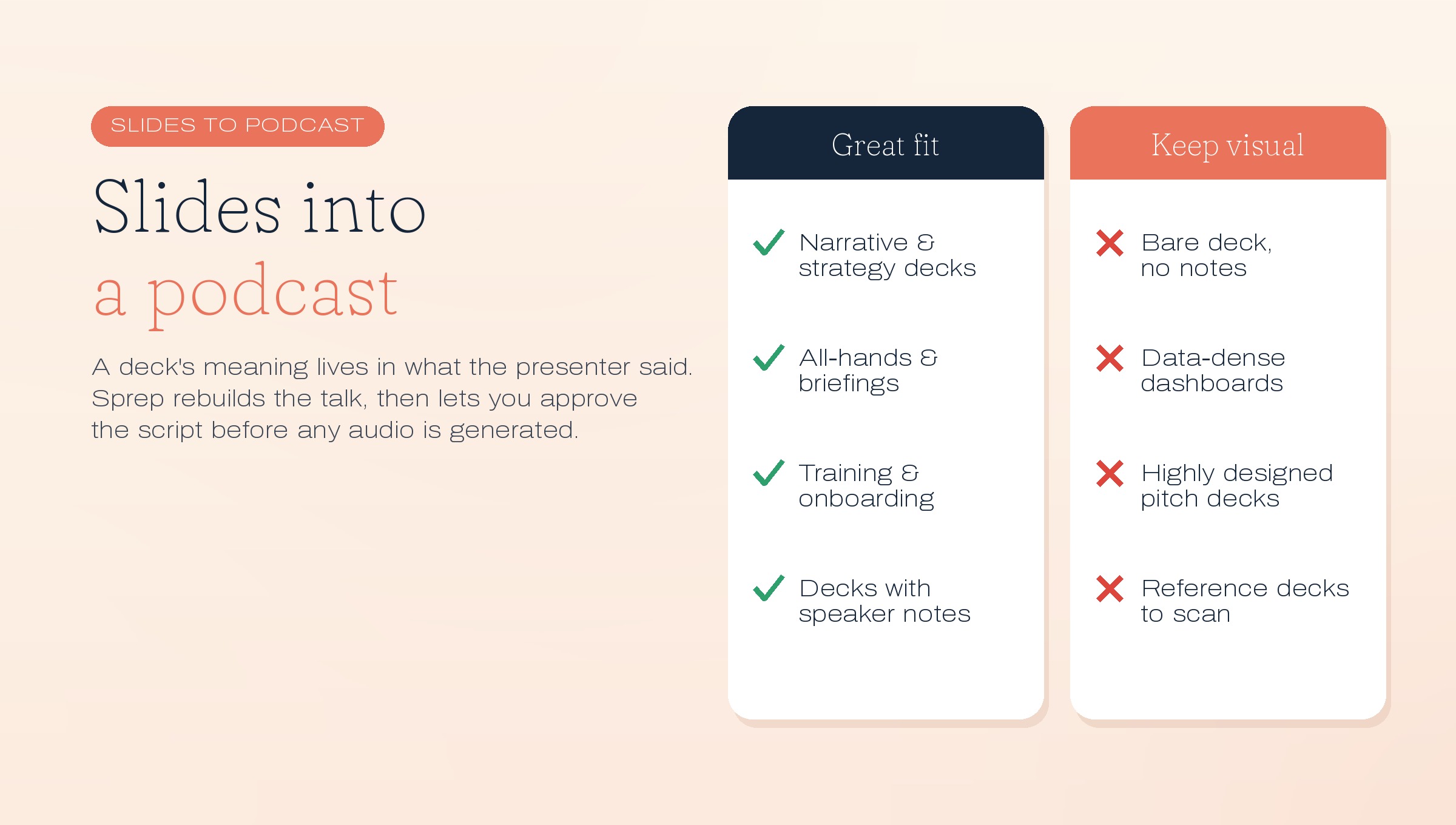
Not every deck should become audio, and the type of deck matters more than for other documents.
Good candidates:
- Narrative or argument decks. A strategy presentation, a point of view, a "here is how we think about X" deck. These have a spine that translates to conversation.
- Conference talks and webinars. Especially with speaker notes or a transcript, since the talk was the content and the slides were secondary.
- Internal briefings and all-hands decks. Where the goal is that people absorb the message, and many will not sit through the recorded video.
- Training and onboarding decks. Covered more fully in our employee onboarding guide, where turning a slide-based module into audio meets people who will not re-open the deck.
Poor candidates:
- Data-dense decks. If every slide is a table or a dashboard, the meaning is visual and audio removes it.
- Decks that are just visual scaffolding. A deck of five words per slide and no notes has no content to reconstruct.
- Highly designed pitch decks. Where the design, the imagery, and the flow are the persuasion, audio loses most of the effect.
- Reference decks people scan. If it is a lookup document that happens to be in slides, keep it visual.
The test is the same as for any document: convert decks whose value is in the argument, keep decks whose value is in the visuals or the lookup. The difference with slides is that a larger share of decks fall into the "visual" category than you might assume, so this filter matters more here.
The accuracy risk is higher with slides#
Worth stating plainly, because it is specific to this format. With a full document, the AI has the complete text and mostly has to restructure it. With a sparse deck, the AI has to infer the connective tissue between fragments, which means it is doing more guessing, which means more opportunity to get it subtly wrong.
That inference is where a deck-to-podcast tool can confidently state something the presenter never said. The slide showed a revenue chart trending up; the deck never claimed why; the generated audio helpfully explains that growth was "driven by strong demand," which may be true, may be false, and was never in your material. AI audio across this category runs around 95 percent accurate, and with sparse decks the risky portion skews higher because there is more inference involved.
This is why, for any deck going to an audience, you need a tool that lets you review the script before the audio is generated, so you can catch the confident invention before anyone hears it. Generate-and-hope is riskier with slides than with any other input.
Step by step#
Pulling it together:
- Expand your speaker notes so the talk behind the slides is written down.
- Cut the non-content slides, titles, dividers, agendas, thank-yous.
- Export with notes included, or upload the native file to a tool that reads notes.
- Choose a tool that lets you edit the script, because sparse decks carry a higher inference risk.
- Review the script carefully, watching specifically for claims the AI added that were never in your deck or notes.
- Generate, then place the audio where the audience is: alongside the recorded talk, in a follow-up email, or in an internal feed.
Where this fits for teams#
For teams, slide-to-podcast has a specific, recurring use: the deck that was presented once and then never consumed again. An all-hands presentation, a quarterly strategy readout, a training session. The video recording exists, but almost nobody watches a 40-minute recorded meeting. A tight audio version of the same content, built from the deck and its notes, gets finished on a commute.
That is the practical payoff. You already made the deck and gave the talk. Converting it to audio extends the reach of work you have already done, which is the same logic as broader content repurposing. And because the argument for it is that people will not otherwise consume the content, it sits squarely inside the unread problem, applied to decks instead of documents. The full comparison of which document types convert well is in our guide to turning any document into a podcast.
Where Sprep fits#
We make Sprep, so treat this as an interested party talking.
Sprep converts a deck, with its speaker notes, into a two-host conversational episode, then stops and hands you the script to review and approve before any audio is generated. For slides specifically, that review step matters more than usual, because it is where you catch the connective claims the AI inferred between sparse slides and correct anything the presenter never actually said. It reads speaker notes, produces audio in 70+ languages from one approved script, and pushes to Slack, Microsoft Teams, an LMS, or a feed, which suits the internal all-hands and training use above. It is Swiss-hosted, and Dätwyler uses it for onboarding.
Where Sprep is the wrong tool: a bare deck with no notes and no transcript gives it little to work from, and the result will be more invention than reconstruction, so add the notes first. It will not turn a data dashboard into good audio. And it does not replace the deck for anything visual; the slides remain the reference, and the audio carries the talk.
You can convert one deck free, notes included, with the full script editor on the free plan.
Frequently asked questions
How do you turn a PowerPoint into a podcast?
Expand your speaker notes so the talk behind the slides is written down, cut non-content slides like titles and dividers, export with notes included or upload the native file, then use a tool that lets you review the script before generating audio. The speaker notes are the most important input, because a deck's meaning lives in what was said, not on the slides.
Why do you need speaker notes to convert a deck to audio?
Because slides are deliberately sparse. The words on a slide are prompts for a presenter who is talking, and the actual content is what they said. Speaker notes are the closest written record of that talk, so including them is what turns fragments like "Three key drivers" into a listenable explanation of what those drivers were.
Can you turn a slide deck with no speaker notes into a podcast?
You can, but the result is less reliable. Without notes, the AI has to infer the connective tissue between sparse slides, which means more guessing and a higher chance of stating something the presenter never said. If a deck has no notes, spend twenty minutes adding them before converting, or expect to correct more in the script.
What kinds of decks work best as podcasts?
Narrative and argument decks, conference talks, webinars, internal briefings, and training decks, especially those with speaker notes or a transcript. Data-dense decks, purely visual scaffolding, highly designed pitch decks, and reference decks convert poorly because their meaning is visual rather than spoken.
How do you export a PowerPoint for podcast conversion?
Export as a PDF using a layout that includes speaker notes, not slides only, or upload the native .pptx to a tool that reads notes directly. Exporting slides-only discards the speaker notes, which are the single most valuable input, so always confirm notes are included in whatever you upload.
Is slide-to-podcast conversion accurate?
It carries a higher accuracy risk than converting full documents, because sparse slides force the AI to infer connections between fragments, and it can confidently state things the presenter never said. Overall AI audio runs around 95 percent accurate, and the risky portion skews higher with sparse decks, which is why reviewing the script before generating audio matters especially here.
Should you cut slides before converting a deck to audio?
Yes. Remove title slides, agenda slides, section dividers, thank-you slides, and appendices, since they add nothing to audio. Convert only the slides that carry meaning, so the conversation is built from content rather than padding, which also keeps the episode focused enough to finish.
What is the best use of slide-to-podcast for teams?
Rescuing decks that were presented once and never consumed again: all-hands presentations, quarterly readouts, and training sessions. Almost nobody rewatches a 40-minute recorded meeting, but a tight audio version built from the deck and its notes gets finished on a commute, extending the reach of work already done.
Can you turn a deck's charts and data into audio?
Not well. Charts and data tables carry meaning visually, and audio removes the visual. Either add a speaker note stating in words what a chart demonstrates, or accept that the audio will point listeners back to the deck for those parts. Keep genuinely data-dense decks visual rather than converting them.
What is the difference between converting a deck and converting a PDF to audio?
A PDF usually contains the full text, so the tool mainly restructures it. A slide deck is intentionally incomplete, so the tool has to reconstruct the talk that went with the slides, which relies heavily on speaker notes. This makes preparation and script review more important for decks than for documents.
Turn your first deck into a podcast
The free plan converts one deck, speaker notes included, into a full episode of up to 15 minutes, with the script editor so you can review and correct every word before any audio is generated.
See it in action