

The short version#
Both tools turn your documents into a two-host audio conversation, so they get compared a lot. But they are built for different goals, and once you see the difference, the choice is usually obvious.
NotebookLM is a free research tool that also makes audio for your own understanding. Sprep is a document-to-podcast tool for audio that other people will hear. If you are studying or digesting your own reading, NotebookLM is excellent and free. If you are publishing audio that carries your name or your company's name, Sprep is built for that, because it lets you approve every word before anything is generated.
We make Sprep, so treat this as informed rather than neutral. We have tried to be fair about where NotebookLM is the better pick, because for a lot of people it genuinely is.
Quick verdict#
Choose NotebookLM if: you want a free tool for personal research, asking questions across many sources, and generating audio just to understand your own material faster. It is hard to beat, and it costs nothing.
Choose Sprep if: you are producing audio for an audience, a team, or customers, and you need it to be accurate, on brand, editable, multilingual, and publishable. That is the job Sprep is designed for.
The dividing line is one question: does the audio represent only you, or does it represent your organization? Everything below comes back to that.
What each tool is actually for#
NotebookLM is a research notebook first, and an audio generator second. Its core job is letting you upload sources and ask questions across them, grounded in your own documents. The Audio Overview, the podcast-style summary, is one feature inside that. It was built so you could listen to your research, not so you could publish a show.
Sprep is a document-to-podcast tool, full stop. Its whole job is turning a PDF, slide deck, Word document, or article into finished, shareable audio. There is no research notebook. It does one thing: produce audio you can stand behind and send out into the world.
This is why Sprep vs NotebookLM is not quite apples to apples. They overlap on exactly one task, making audio from documents, and diverge everywhere else. If you need the research Q&A side, NotebookLM wins by default because Sprep does not try to do it.
The core difference: can you edit the script?#
This is the single biggest difference, and it decides most cases. With NotebookLM, you cannot edit the audio script. With Sprep, editing the script is the entire point.
NotebookLM lets you give instructions before it generates, guiding the focus and tone. But once the Audio Overview is made, the words are locked. If it mispronounces a founder's name, invents a small detail, or emphasizes the wrong point, you cannot fix that one thing. You regenerate the whole overview and hope the next version is better. People often generate the same audio several times to get one they can accept. We cover can you edit NotebookLM audio, including five workarounds, in a separate guide.
Sprep works the opposite way. The AI drafts a two-host script, then stops and hands it to you in a script editor. You read it, correct anything wrong, adjust the tone, and only then generate the audio. Nothing is voiced until you approve it, on every plan, including the free one.
Why this matters so much: one-shot audio tools produce results users often describe as around 95 percent accurate, with the last few percent subtly wrong. For personal study, 95 percent is fine. For anything with your name on it, the wrong 5 percent is exactly what a listener will notice and repeat. A review step before generation is the fix, and it is the reason Sprep exists.
What the review step actually catches#
"Approve every word" sounds abstract until you have done it a few times. In practice the same categories of problem come up repeatedly, and none of them are the dramatic hallucinations people imagine.
Names and pronunciations. Founder names, product names, place names, and acronyms. A generated host will confidently say a name wrong, and there is no way to know until you hear it. In a script editor you can respell it phonetically before it is ever voiced.
Confident over-summarisation. The most common real failure is not an invented fact, it is a qualified statement from your document arriving as an unqualified one. "Results were promising in early trials" becomes "results were strong." Nothing was fabricated, but the claim got stronger on the way through, and it is now your company saying it.
Emphasis in the wrong place. A source document might mention a caveat in one line and a headline number in another. Generation frequently leads with the number and buries the caveat, which reads as spin even when nobody intended it.
Missing context a listener needs. Documents assume readers can look back at the previous section. A listener cannot. Generated scripts often carry that assumption over, referring to something that was clear on page four and is invisible in audio.
Stale specifics. Dates, figures, and policy details that were current when the document was written and are not current now. The generation is faithful to the source, which is precisely the problem.
None of these are catastrophic on their own. All of them are the sort of thing that, once published, requires a correction, and corrections cost more credibility than the original content earned.
The honest cost of the review step#
Being straight about the tradeoff, because a comparison that presents the review step as pure upside is not useful.
NotebookLM is faster. Upload, generate, listen. There is no point at which a human has to read anything. If you are digesting your own reading on a commute, adding a review step is pure friction for zero benefit, and you should not do it.
Review takes real time. Reading a script for a fifteen-minute episode takes a few minutes, and doing it properly rather than skimming takes longer. For a team publishing weekly, that is a recurring commitment that has to belong to someone by name.
It only pays off when the output is public. The value of catching a wrong figure scales with how many people hear it and whose name is attached. For an audience of one, that value is close to zero.
The practical consequence: teams that adopt a review-based tool and then skip the review get the worst outcome available. They pay for a workflow they are not using and end up with the same accuracy profile as the free tool. Decide who owns the review before you switch.
Voices and format#
NotebookLM gives you two fixed AI hosts. Sprep gives you a voice library and brand control.
With NotebookLM, you get the same two presenters every time, with no way to change the voices or match them to your audience. The audio is genuinely good; it just is not yours to shape.
Sprep offers a voice library on all plans, custom brand voices on Team plans, and executive voice cloning on Enterprise. Both tools produce natural two-host conversations rather than a single robotic voice, but Sprep lets you decide who is speaking and how it sounds.
Languages#
Both support many languages, and this is a place NotebookLM has genuinely caught up. NotebookLM now generates Audio Overviews in 80+ languages, so the old English-only complaint no longer applies. Step supports 70+ languages, and on Team plans it can translate one approved master script into all of them with a single click. The practical difference is the workflow: with prepare you review the message once, then ship it in every language from that approved version, which matters when the content is compliance- or brand-sensitive.
Worth noting the direction of that difference. On raw language count, NotebookLM is ahead. On multilingual workflow, the question is whether you are reviewing one master script or nine independently generated outputs, which is a different problem that gets harder as you add languages rather than easier.
Publishing and distribution#
NotebookLM does not publish. Sprep does. This is a clean, decisive gap for anyone producing audio for others.
NotebookLM shares through notebook links or downloads. There is no podcast feed, no one-click publishing, no direct route into your team's tools.
Sprep exports MP3 and WAV, embeds a player, and pushes audio to RSS feeds, Slack, Microsoft Teams, an LMS, and private podcast feeds. It also has intent templates (Executive Briefing, Compliance Training, Onboarding, Marketing) that shape the audio for the job before you publish it. If the audio needs to reach an audience or a workforce, this is the difference between a finished workflow and a dead end.
Data, hosting, and compliance#
Sprep is Swiss-hosted, which is a real factor for regulated teams. NotebookLM runs on Google's infrastructure. For data residency and compliance conversations, Sprep's Swiss hosting is often the deciding detail, and Dätwyler uses it for onboarding and internal communications. For a personal research project, this rarely matters. For an enterprise handling sensitive documents, it can be the whole conversation. For a full breakdown of tiers, residency, and the approval gap, see NotebookLM compliance for regulated teams.
Pricing#
NotebookLM is free. Sprep has a free plan and paid tiers. NotebookLM costs nothing with a Google account and includes generous limits, which is a genuine strength and the main reason to choose it for personal use.
Sprep's free plan includes one podcast of up to 15 minutes with the full script editor, so you can test the review workflow before paying. Paid plans add more audio, languages, brand voices, and distribution. If your need is personal and occasional, free NotebookLM is the rational choice. If you are publishing regularly and need control, the paid gap buys you the editing, branding, and distribution NotebookLM does not offer at any price.
Sprep vs NotebookLM at a glance#
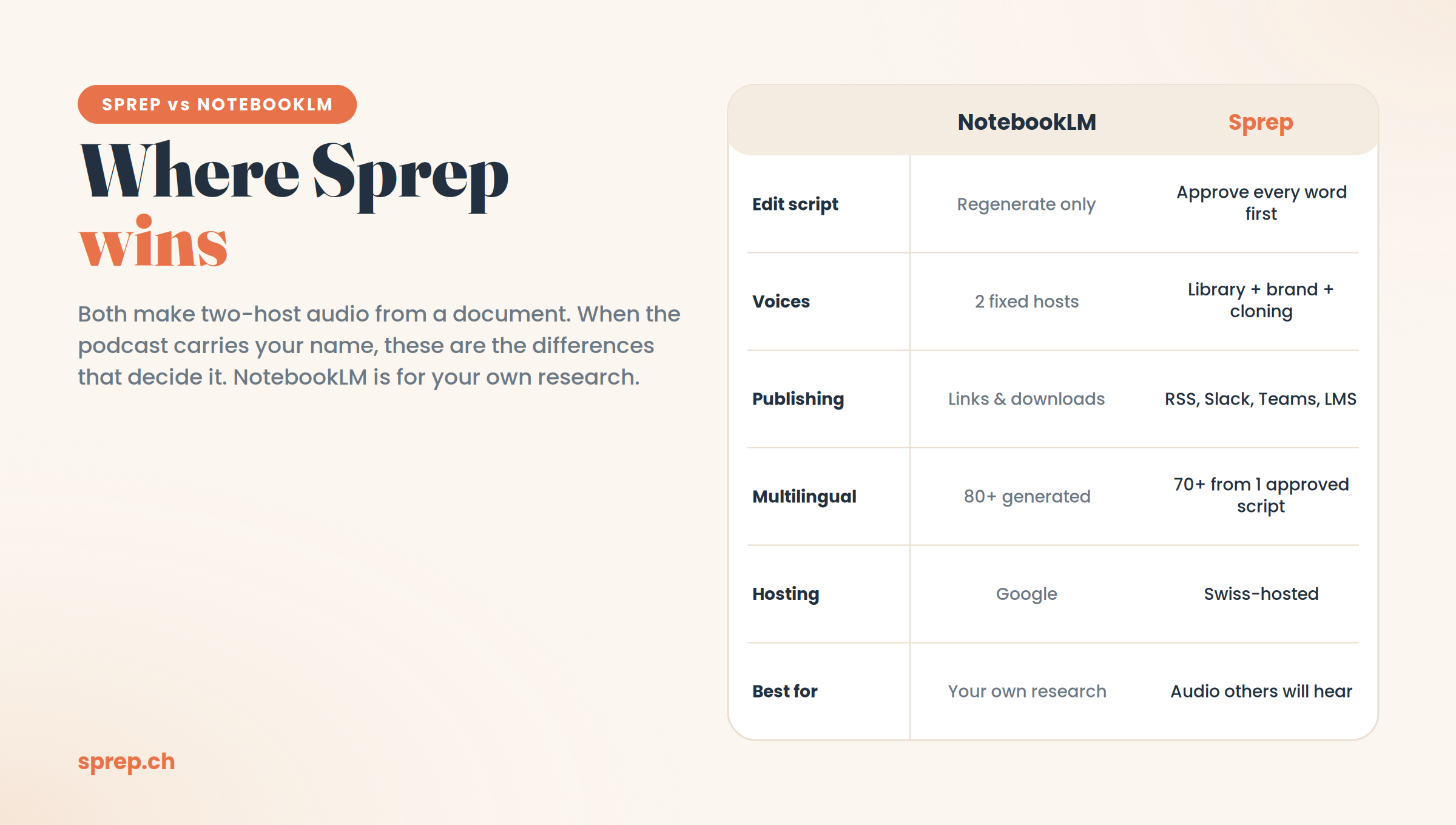
| NotebookLM | Sprep | |
|---|---|---|
| Built for | Research and personal understanding | Publishing document-to-podcast audio |
| Edit the audio script | No, regenerate only | Yes, approve every word first |
| Voices | Two fixed hosts | Voice library, brand voices, cloning |
| Languages | 80+ | 70+, 1-click translation on Team |
| Publishing | Links and downloads | RSS, Slack, Teams, LMS, feeds |
| Hosting | Google infrastructure | Swiss-hosted |
| Research Q&A | Yes, its core strength | No |
| Price | Free | Free plan plus paid tiers |
Numbers move quickly, so check each tool's site before you decide.
Using both together#
The framing of this article is a versus, but the common real-world outcome is not a choice at all.
Because NotebookLM is free and strong at the research half, and Sprep does not attempt that half, plenty of teams run both without any conflict. The pattern looks like this: explore a set of documents in NotebookLM, ask questions across them, work out what actually matters and what the argument is. Then take the source material into Sprep when something needs to be produced for other people.
That split follows the strengths honestly. You are using a free tool for the exploratory work where accuracy is self-correcting, because you will notice if an answer is wrong, and a reviewed tool for the published work where accuracy is not self-correcting, because your audience will not know to check.
If you are evaluating more than these two, the wider category is covered in our guide to the best NotebookLM alternatives, and the three-way comparison with ElevenLabs is in ElevenLabs vs NotebookLM vs Sprep.
So which one should you use?#
Use NotebookLM if the audio is for you. For studying, research, and understanding your own documents faster, it is excellent, free, and does not need any of the publishing machinery Sprep adds. If you also need to ask questions across your sources, NotebookLM is the clear pick, because that is its main job and Sprep does not do it.
Use Sprep if the audio is for other people. The moment you are publishing to an audience, training employees, or sending audio to customers, the ability to review and approve every word before it is voiced stops being optional. Add editable brand voices, one-click translation, real distribution, and Swiss hosting, and Sprep is built for exactly the job NotebookLM was not designed to do.
They are not really rivals so much as tools for two different moments. You can try Sprep free with one podcast and the full script editor included, and see the difference the review step makes.
Frequently asked questions
Is NotebookLM free?
Yes. NotebookLM is free with any standard Google or Workspace account and includes generous limits for sources and daily use. Prep also has a free plan with one podcast of up to 15 minutes and the full script editor.
Can you edit the podcast NotebookLM creates?
No, not the finished audio. You can give instructions before it generates, but once the Audio Overview is made, you cannot edit the script and have to regenerate the whole thing. Sprep lets you edit and approve the script before any audio is produced.
Does Sprep replace NotebookLM?
Only for the audio side. Sprep replaces and improves on the document-to-podcast job, with editing, branding, and publishing. It does not replace NotebookLM's research and question-answering, which Sprep does not do. Many people use both.
Is NotebookLM good for studying?
Yes, it is one of the better free tools for studying and personal research, especially for asking questions across your own sources. Its limits show up when you try to publish the audio or make it accurate enough to represent an organization.
Which is better for teams and companies?
Sprep, in most cases, because teams usually need accurate, on-brand, publishable audio with a review step and proper distribution. NotebookLM is better suited to individual research than to producing audio for an audience.
Do both tools make the same kind of audio?
Both produce a natural two-host conversation rather than a single robotic voice. The difference is control: NotebookLM gives you two fixed hosts and a locked script, while Sprep lets you choose voices and approve every word first.
What kinds of errors does reviewing the script actually catch?
Mostly small ones rather than dramatic fabrications: mispronounced names and acronyms, qualified claims that arrive unqualified, emphasis landing on a headline number rather than its caveat, missing context a listener cannot look back for, and figures that were current in the source document but are not current now.
Is NotebookLM faster than Sprep?
Yes, because it skips the review step entirely. Upload, generate, listen. That speed is a genuine advantage when the audio is only for you, and a genuine liability when it is published, since nothing checks the output before an audience hears it.
Can you use NotebookLM and Sprep together?
Many teams do, and the split follows each tool's strengths. NotebookLM handles exploratory research and document Q&A, where a wrong answer is self-correcting because you will notice. Sprep handles anything produced for other people, where errors are not self-correcting because the audience has no way to check.
Which tool supports more languages?
NotebookLM currently generates Audio Overviews in 80+ languages against Sprep's 70+, so on raw count NotebookLM is ahead. The practical difference is workflow: Sprep translates one approved master script into every language, so the review burden does not multiply as you add languages.
See it in action