
All three tools take a document and give you back a two-host podcast. That is where the similarity ends.
Most comparisons of these tools score them out of ten and tell you ElevenLabs has better voices. That is true, and it is not the thing that will decide your choice. The things that decide it are whether you can fix the words before they become audio, whether you can get the finished episode to an audience, and whether you are allowed to publish the result at all.
We make Sprep, one of the three, so read this as informed rather than neutral. We will tell you plainly where the other two are the better choice, because for a lot of people, they are.
Quick verdict#
Use NotebookLM if The audio is for you. Free, excellent for research and personal understanding, and you should not switch away from it to solve a problem you do not have.
Use ElevenLabs if voice quality and production depth are what you care about most, and you are building inside a full audio and video studio. Best-in-class voices, real editing, and now a video timeline too. Check the commercial terms first; see below.
Use Sprep if Your job is turning documents into podcasts that other people will hear, and the words have to be right. Script review on every plan, including the free one, with distribution built for teams.
What each tool actually is#
This is the part that explains everything else.
NotebookLM is a research tool that happens to make audio. Its main job is helping you think with your own sources. The Audio Overview is a way to consume your research, not to publish it. Once you understand that, its limits stop looking like flaws and start looking like scope.
ElevenLabs is a voice platform, and podcasts are one thing it makes. GenFM, the document-to-podcast feature, lives inside ElevenLabs Studio, which is now a full audio and video editor with music, sound effects, captions, and a timeline. Podcasting is one workflow among many.
Sprep is a document-to-podcast tool and nothing else. It does not do research question answering. It does not do video. It takes a document, drafts a two-host conversation, makes you approve every word, and then produces and distributes the audio.
Can you edit the script before it becomes audio?#
This is the first question that matters, and it cleanly separates the three tools.
NotebookLM: no. Once an Audio Overview is generated, there is no script to edit and no way to fix a single line. All your control happens before you press generate: a steering prompt, a format, a language, and which sources to include. After that, your only option is to delete the audio and generate a new one. If a name is mispronounced, you regenerate the whole episode and hope the next attempt does better. The full breakdown, with five workarounds, is in can you edit NotebookLM audio.
ElevenLabs: yes. This is a real strength, and it deserves credit. In Studio, GenFM generates the text of your podcast first, and ElevenLabs' own documentation is explicit that you can check and edit that text before you convert it to audio. When you are happy, you click convert. That is the right order of operations.
Sprep: yes, and it is the entire product. The AI drafts the script, then stops. You read it, rewrite it, approve it, and only then is any audio generated. It is on every plan, including the free one.
So on this question, ElevenLabs and Sprep are on the same side of the line, and NotebookLM is on the other. Anyone telling you the script editor is unique to one tool is selling you something.
Voices and production#
ElevenLabs wins this outright, and it is not close. Studio gives you access to a library of over 10,000 voices, voice cloning, music, sound effects, and text-based audio editing. If raw voice quality is your priority, this is the answer. It is what ElevenLabs is famous for, and other tools in this category, including Wondercraft and ours, do not match it.
NotebookLM gives you two fixed AI hosts. You cannot change them, swap them, or match them to your brand. The audio is genuinely good, but it sounds like NotebookLM, because it always does.
Sprep sits in between. There is a voice library on all plans, custom brand voices on Team, and executive voice cloning on Enterprise. It is built for on-brand audio rather than for sound design. There is no music bed, no effects timeline, no video. If you want a production studio, ElevenLabs is the better tool, and we would rather say so than pretend otherwise.
Languages#
NotebookLM leads in raw count; Sprep leads in workflow.
NotebookLM generates Audio Overviews in 80+ languages, per Google's own help documentation, and non-English overviews were recently upgraded to the same full-length depth as the English ones. That is a real strength, and the old English-only criticism is dead. Worth checking current documentation for which secondary controls, such as length settings and interactive mode, are available outside English, since those have historically lagged the core feature.
ElevenLabs' GenFM has historically supported podcasts in 32 languages, fewer than the other two.
Sprep produces audio in 70+ languages, and on Team plans it translates one approved master script into all of them with a single click. The number matters less than the sequence: you approve the message once, in one language, and everything else derives from the version you already checked.
Language counts change constantly in this category. Verify on each site before you decide.
Can you actually publish it?#
This is where NotebookLM stops being an option for creators.
NotebookLM has no publishing pipeline. You can download the file and share a notebook link, and that is it. No RSS feed, no one-click route to Spotify or Apple. If you want a podcast, you are uploading files to a host yourself. Worth noting: public notebook sharing is disabled for some Workspace Enterprise and Education accounts, so depending on your organisation, even link sharing may not be available.
ElevenLabs lets you export your audio from Studio. It is an export, not a distribution system.
Sprep exports MP3 and WAV on Creator plans and above, embeds a player, and pushes audio into RSS feeds, Slack, Microsoft Teams, an LMS, and private podcast feeds. That last set matters more for internal audio than for a public show, which tells you where Sprep is aimed.
If your goal is a public podcast with hosting and one-click publishing everywhere, none of these three is the purest fit. A dedicated podcast platform like Jellypod does that job more completely, and we would rather point you there than oversell. The wider category is compared in the best NotebookLM alternatives.
The question creators forget: are you allowed to publish it?#
Before you build anything on top of a tool, read what its terms say about commercial use. This is the least exciting paragraph in this article and the one most likely to save you.
ElevenLabs' Studio terms state that, unless you are on an Enterprise plan, Studio is made available solely for personal, non-commercial use. GenFM lives inside Studio. At the same time, ElevenLabs' own announcement of bringing GenFM to Studio talked about creating, exporting, and monetizing your creations. Those two statements are difficult to reconcile from the outside.
We are not lawyers; we are not going to interpret another company's contract for you, and terms change. What we will say is this: if you intend to publish or monetize, read the current Studio terms yourself before you build a workflow on top of them, and if it genuinely matters to your business, ask ElevenLabs directly.
The same discipline applies to every tool here, including ours. Check the terms of whichever one you choose against what you actually plan to do with the output. Nobody does this, and it is exactly the kind of thing that surfaces after you have published forty episodes.
The accuracy problem, in their own words#
Here is the strongest argument for reviewing a script, and it does not come from us.
Google's own documentation states that Audio Overviews, including the voices, are AI-generated and may contain inaccuracies or audio glitches, and it goes further, warning of glitches like random speaker switches and a third voice appearing.
ElevenLabs' own Studio terms state that output may not accurately reflect real people, places, facts, or even the input you provided, and that you should review all output for correctness before sharing it, employing human review where necessary.
Read those two together. Both makers tell you the same thing: check the output before you use it.
The difference is what happens next. ElevenLabs gives you a script to check and fix. Sprep makes checking it a required step. NotebookLM tells you to check it and then gives you no way to change it.
That is the whole argument. Not that AI audio is bad, but that it is good enough to be believed, and both of the biggest players in this space say in writing that you should verify it before anyone hears it.
Where each tool breaks down at scale#
The comparison above assumes you are making one podcast. Producing them regularly changes which weaknesses actually hurt.
NotebookLM at volume becomes a listening problem. Because you verify by listening rather than reading, and because a bad take means regenerating the whole episode, the time cost scales with episode length multiplied by attempts. At one episode a month that is tolerable. At one a week it consumes a meaningful part of somebody's role.
ElevenLabs at volume becomes a scope problem rather than a capability one. Studio is a production environment, which means each episode passes through a workflow designed for craft rather than throughput. That is exactly right if audio quality is the product and heavier than needed if you are converting routine documents.
Sweep at volume becomes a review bottleneck. Someone has to read every script, and that person is the constraint on how much you ship. The one-click translation helps because you review once rather than per language, but the core review does not disappear, and any team that skips it has removed the only reason to use the tool.
The general point: at low volume all three are fine and you should choose on features. At high volume you are really choosing which recurring cost you would rather carry, listening time, production time, or reading time.
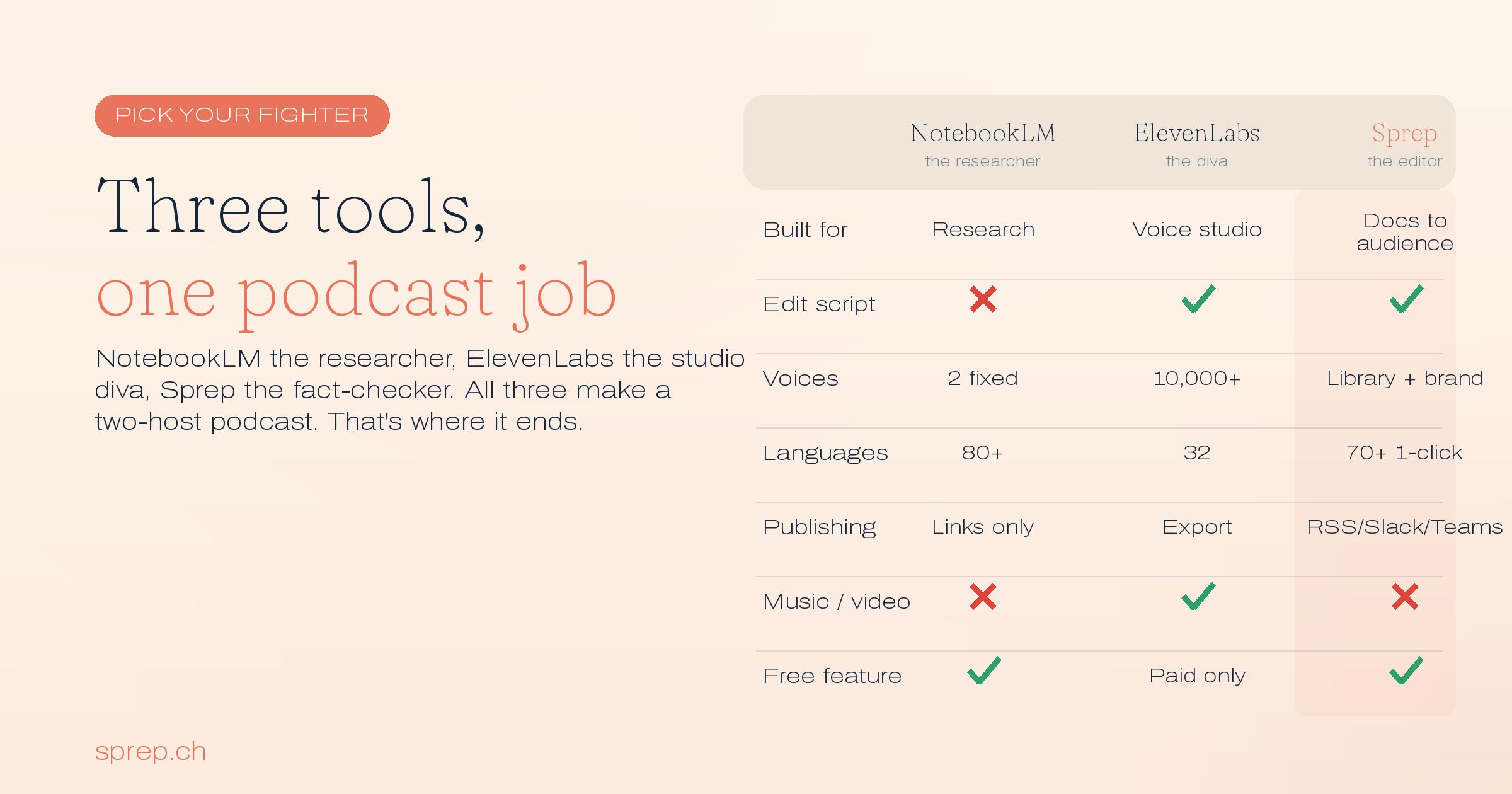
ElevenLabs vs NotebookLM vs Sprep compared#
| NotebookLM | ElevenLabs (GenFM) | Sprep | |
|---|---|---|---|
| Built for | Research and personal understanding | Voice and audio production | Document-to-podcast for an audience |
| Edit the script before the audio | No, regenerate only | Yes | Yes, on every plan |
| Voices | 2 fixed hosts | 10,000+, plus cloning | Voice library, brand voices, cloning |
| Languages | 80+ | 32 | 70+, 1-click translation on Team |
| Publishing | Links and downloads | Export from Studio | RSS, Slack, Teams, LMS, feeds |
| Music, effects, video | No | Yes | No |
| Free access to the feature | Yes | No, GenFM needs a paid plan | Yes, 1 podcast with full editor |
| Hosting | ElevenLabs | Swiss-hosted |
Features and counts move fast in this category. Check each site before deciding.
So which one should you use?#
If the audio is for you, use NotebookLM. It is free, it is very good, and none of this article's criticisms apply to listening to your own research on a commute. Do not pay for a tool to solve a problem you do not have.
If you care most about how it sounds, use ElevenLabs. The voices are the best in the category, the script is editable, and Studio gives you real production depth. Just note that GenFM requires a paid subscription, and read the commercial terms before you monetize.
If your job is turning documents into audio that represents you or your company, and the words have to be right, that is what we built Sprep for. Script review on every plan including the free one, intent templates for jobs like onboarding and compliance training, 70+ languages from one approved script, and distribution into the tools teams already use. The direct head-to-head with NotebookLM is in Sprep vs NotebookLM, and if you are also weighing Wondercraft, that comparison is in Wondercraft alternatives. For regulated content specifically, see NotebookLM compliance: what regulated teams need to know.
You can try Sprep free: one podcast, the full script editor, and you approve every word before it becomes audio.
Frequently asked questions
Is ElevenLabs better than NotebookLM?
For voice quality and production control, yes. ElevenLabs has thousands of voices, cloning, and a full editor, and it lets you edit the podcast script before converting it to audio. For free personal research and question answering across your own sources, NotebookLM is better and costs nothing. They are built for different jobs.
Can you edit the podcast script in ElevenLabs?
Yes. In Studio, GenFM generates the text of your podcast first, and ElevenLabs' documentation states you can check and edit that text before converting it to audio.
Can you edit the podcast script in NotebookLM?
No. Once an Audio Overview is generated, you cannot edit the script or the audio. You can only delete it and generate a new one with different instructions.
Is ElevenLabs GenFM free?
No. ElevenLabs Studio is available on all plans, including the free one, but the podcast generation feature specifically requires a paid subscription. NotebookLM's Audio Overviews are free, and Sprep's free plan includes one podcast with the full script editor.
How many languages does each tool support?
Google's documentation lists 80+ languages for NotebookLM Audio Overviews. ElevenLabs has supported GenFM podcasts in 32 languages. Sprep supports 70+ languages, with one-click translation of an approved script on Team plans. These numbers change often, so verify before deciding.
Which is best for publishing a podcast?
None of these three is a complete podcast platform. NotebookLM has no publishing at all. ElevenLabs exports audio. Sprep pushes to RSS, Slack, Teams, and LMS, which suits internal and team audio more than a public show. For full hosting and one-click publishing to Spotify and Apple, a dedicated podcast platform like Jellypod is the better fit.
Can I use AI podcast audio commercially?
It depends entirely on the tool and your plan, and you should read the current terms rather than assume. ElevenLabs' Studio terms, for example, state that outside of Enterprise plans, Studio is provided for personal, non-commercial use, while their marketing has described monetizing your creations. Check the terms of whichever tool you choose against what you actually plan to do.
Do NotebookLM and ElevenLabs admit their output can be wrong?
Both do, in writing. Google's documentation says Audio Overviews are AI-generated and may contain inaccuracies or audio glitches. ElevenLabs' Studio terms say output may not accurately reflect real people, places, facts, or even the input provided, and advise reviewing all output before sharing, with human review where necessary.
Which tool is best if you produce podcasts every week?
It depends which recurring cost you prefer. NotebookLM costs listening time, since verification means hearing the whole episode and errors mean regenerating it. ElevenLabs costs production time, since Studio is built for craft rather than throughput. Sprep costs reading time, since every script needs review, though translation is reviewed once rather than per language.
Can you use more than one of these tools together?
Yes, and it is common. NotebookLM handles exploratory research where a wrong answer is self-correcting because you will notice it. A tool with script review handles anything published, where errors are not self-correcting because your audience cannot check. The tools overlap on one task and diverge everywhere else, so they combine without much friction.
See it in action